Unit testing is an important part of growing codebases to catch logic errors without holding back development pace across developers and teams. Go provides great builtin tooling for writing, managing and executing tests so all team members stay within the same ecosystem.
Basic unit testing structure
Unit tests are most commonly written as whitebox tests, meaning they live in the same package as the code they test, allowing them direct access to unexported functions and variables.
Suppose you have a function CheckPass() in package sample::
sample.go
package sample

func CheckPass(password string) bool{
  if password == "secret"{
    return true
  }
  return false
}
To test the CheckPass function, create a second file next to it:
sample_test.go
package sample

import "testing"

func TestCheckPass(t *testing.T){
  if CheckPass("bad"){
    t.Errorf("accepted bad password %q", "bad")
  }
}
Test files must import the testing package and test functions should be in the format TestFuncname(t *testing.T), where Funcname is the name of the function to test.
Test logic is expressed through methods of t like t.Errorf to mark a test as failed or t.Fatal to fail the test and stop the testing process entirely. If a test function completes without calling an error function, it is considered successful.
To run the test, simply run
go test .Alternatively, run go test ./... to run tests in all subpackages as well.
The sample above will print output similar to this
PASS
ok  	sample	0.001s
A failing test would look something like this instead:
--- FAIL: TestCheckPass (0.00s)
    sample_test.go:7: accepted wrong password 'badpass'
FAIL
exit status 1
FAIL	sample	0.001s
Subtests and table driven testing
It is common to test functions with more than one case, at the very least a positive (passing) and a negative (failing) test - often many more. In order to isolate test cases from each other while still keeping them grouped, subtests ("tests within a test") are used together with a predefined table of test data and expected results.
package sample

import "testing"

func TestCheckPass(t *testing.T){
  tests := []struct{
    name string
    pass string
    wantResult bool
  }{
    {
      name: "first bad value",
      pass: "bad",
      wantResult: false
    },
    {
      name: "second bad value",
      pass: "also bad",
      wantResult: false
    },
    {
      name: "correct value",
      pass: "secret",
      wantResult: true
    },
  }
  for _, tt := range tests{
    t.Run(tt.name, func(t *testing.T){
      if res := CheckPass(tt.pass); res != tt.wantResult{
        t.Errorf("wanted result=%v, got result=%v", tt.wantResult, res)
      }
    })
  }
}
This approach is often called the "table pattern" or "table driven testing", because it loops through a table of test conditions. A slightly more complex example including errors and catching panics may look like:
func TestComplexSampleFunc(t *testing.T){
  tests := []struct{
    name string
    data string
    wantResult string
    wantErr bool
    wantPanic bool
  }{
    {
      name: "good value",
      data: "sample data",
      wantResult: "sample result",
      wantErr: false,
      wantPanic: false
    },
    {
      name: "bad value",
      data: "bad sample",
      wantResult: "",
      wantErr: true,
      wantPanic: false
    },
    {
      name: "invalid value",
      data: "invalid sample data",
      wantResult: "",
      wantErr: false,
      wantPanic: true
    },
  }
  for _, tt := range tests{
    t.Run(tt.name, func(t *testing.T){
      defer func(){
        r := recover();
        if (r == nil) != tt.wantPanic{
          t.Errorf("wanted no panic, got panic=%v", r)
        }
      }()
      result, err := ComplexSampleFunc(tt.data)
      if (err != nil) != tt.wantErr{
        t.Errorf("want err=%v, got err=%v", tt.wantErr, err)
      }
      if result != tt.wantResult{
        t.Errorf("want result=%v, got result=%v", tt.wantResult, result)
      }
    })
  }
}
This example is a fair bit more complex than the first one, testing a function ComplexSampleFunc that has expected return data, a returned error and possibly panic on invalid data.
Unit tests in go will often resemble this form as it condenses most of the testing harness logic as much as possible, allowing code readers to skip most of it and focus only on the test data table at the top to understand the test cases.
Test coverage
Keeping track of what code is or isn't covered by tests yet is the purpose of coverage reports.
Go can fully automatically analyze source files to figure out which lines of code were checked during tests and which were missed.
The simplest way is to generate a coverage profile when running tests:
go test -coverprofile=coverage.outThe output will show a text-based analysis of the coverage:
PASS
coverage: 66.7% of statements
ok  	sample	0.001s
The only difference to a normal unit test run is the generation of coverage.out and the coverage: line in the output. A more helpful HTML report can be generated from the coverage.out file, showing a line-by-line breakdown of coverage:
go tool cover -html=coverage.outThe report should automatically open in your default browser once generated:
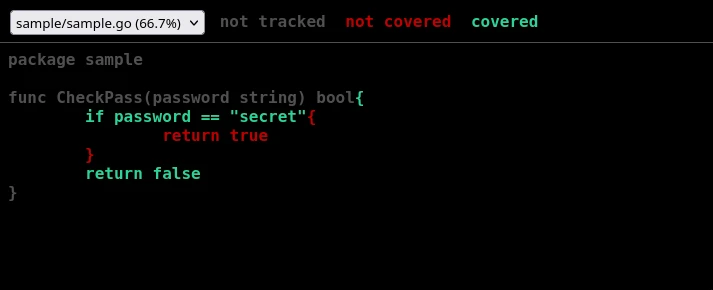
The green lines are covered by tests, red lines are not. If a package contains multiple source files, they can be switched between with the dropdown in the top left corner.
Since generating a coverage report, turning it into HTML and deleting it afterwards (to prevent vcs clutter), you should create a local alias:
alias cover="go test -coverprofile=coverage.out \
  && go tool cover -html=coverage.out \
  && rm -f coverage.out"
A cautionary warning is in order here: Do not chase 100% test coverage by checking covered lines of code alone; Always test overall logic, not lines.
Here is a simple example to illustrate:
func FormatLog(isDebug bool, msg string) string{

  if isDebug{
    msg = "[DEBUG] " + msg
  }
  if strings.ContainsRune(msg, ' '){
    msg = `"` + msg + `"`
  }
  return msg
}
Suppose you achieved 100% coverage with these tests:
func TestFormatLog(t *testing.T){
  tests := []struct{
    name string
    isDebug bool
    msg string
    wantResult string
  }{
    {
      name: "debug prefix",
      isDebug: true,
      msg: "test",
      wantResult: "[DEBUG] test",
    },
    {
      name: "quote message",
      isDebug: false,
      msg: "test",
      wantResult: `"test"`,
    },
  }
  // standard table loop here
}
The coverage report will show 100% and mark all lines green, but there is a subtle error remaining where setting addDebug to true for a msg param containing whitespace will quote the result as "[DEBUG] test" instead of [DEBUG] "test". Always think about the intended logic instead of testing each condition individually.
Dealing with side effects
Unit test functions in go are mostly isolated from one another, but that does not apply to the package and functions being tested.
Suppose you have a package clock:
clock.go
package clock

var counter int = 0

func Tick(){
  counter++
}

func GetTicks() int{
  return counter
}
Testing Tick and GetTicks individually will work on the first run, but fail on subsequent ones because the counter variable retains state across test runs. Since the order of unit test execution is not guaranteed, you cannot rely on previous function state and build on top of it either; the only reliable solution is to reset counter between tests.
Go allows attaching a cleanup function to tests that run when it and all its subtests complete:
func TestDummy(t *testing.T){
  t.Cleanup(func(){
    // clean up after this test completes
  })
  // t.Run(...
Subtests do not inherit cleanup functions implicitly, so each needs to be assigned their own copy if you want to run cleanup between individual tests within a test function:
func TestDummy(t *testing.T){
  //tests := []struct{ ...
  for _, tt := range tests{
    t.Run(tt.name, func(t *testing.T){
      // attach cleanup function to every subtest
      t.Cleanup(func(){
        // clean up after subtest
      })
      // run test logic here
  }
}
Make sure to reset any retained state after tests on function with side effects. The typical culprits are package-internal counters and caches, modified os.Args or environment variables (even when modifying them from within the test function itself, those changes persist across tests unless reset).
Catching output and exit codes
When writing packages that interact with stdout or stderr streams, or that need to set specific exit codes on error conditions, testing becomes a little trickier than the intuitive table driven pattern.
While you may occasionally hear recommendations like "don't test such code" or "separate message formatting and printing", real codebases rarely work like that. And while it is true that nobody should rely on the specific format of log output, someone in a large company inevitably will, and a change in output ordering will break something, somewhere.
Testing output streams alone is fairly straight forward since you can reassign os.Stdout or os.Stderr to a pipe for recording:
func TestPrint(t *testing.T){
  old := os.Stdout
  defer func(){
    // undo stdout replacement
    os.Stdout = old
  }()
  r, w, _ := os.Pipe()
  defer w.Close()
  os.Stdout = w
  // run tests that write to stdout here
  os.Stdout =  old
  var buf bytes.Buffer
  io.Copy(&buf, r)
  output := buf.String()
  // "output" now contains everything written to stdout
}
Unfortunately, testing the exit code of a program is a lot more complex. Since go cannot capture the exit code of itself after it has returned, it has to recursively call itself in a subprocess, make sure to run only the current test with an environment variable indicating to actually run the exiting/crashing function, and record the exit code that way.
It will typically look like this:
func TestLogFatal(t *testing.T){
  if os.Getenv("RUN_TEST_FUNC") == "1"{
    // run the func being tested that will exit/crash
    mylogger.Fatal("Terminating the program")
    return
  }
  cmd := exec.Command(os.Args[0], "-test.run=TestLogFatal")
  cmd.Env = append(os.Environ(), "RUN_TEST_FUNC=1")
  err := cmd.Run()
  exitErr, ok := err.(*exec.ExitError)
  if !ok{
    t.Fatalf("expected ExitError, got %v", err)
  }
  if code := exitErr.ExitCode(); code != 1{
    t.Fatalf("wanted exit code %d, got %d", 1, code)
  }
}
The first if condition is skipped when go test runs the function first, causing it to spawn a new process reusing the name of the compiled test executable os.Args[0] and appending the -test.run=TestLogFatal flag so it will only run this one test function in the newly spawned subprocess. By setting the environment variable RUN_TEST_FUNC=1 for the subprocess, it will instead run the contents of the first if condition and skip the rest, executing the function to be tested.
Recursive function patterns like this are not immediately obvious to reason about when reading code, so reserve them for code that absolutely has to check exit codes, falling back to the simpler stdout/stderr recording solution when only needing output alone.
That concludes the guide on unit testing essentials in go. The patterns and solutions in this article should cover the vast majority of unit testing needs, but that does by no means make the list exhaustive. Go provides a wealth of additional features like hiding long-running/expensive tests behind a -long flag, parallel test execution, blackbox testing from separate test packages and builtin fuzzing and benchmarking test suites.