Companies and organizations typically have numerous internal and external services for their employees to work efficiently - as long as they remember them all.
The internal tool sprawl problem
Enabling employees to work effectively requires multiple services and software products: Mail or messengers for communication, project management tools, wikis and notification pages, file sharing, .... the list goes on.
Providing these tools puts a burden on employees to remember all the different services and addresses supposed to optimize their work day, inevitably leading to underused or entirely forgotten tools. Many tools like messaging servers or project management tools do not work reliably if even a small portion of users is not using them.
Especially when onboarding new hires, a large list of existing tools to use quickly becomes overwhelming. More friction means more time before they become productive, costing real money in the process.
Internal wikis are a clunky solution
The first approach to solve the forgotten link issue is to set up an internal wiki page documenting them all. That may work briefly, but eventually falls apart.
Users do not have a reason to revisit the wiki page consistently, so if they forget a tool exists, there is no reminder unless they remember and go check.
Additionally, most employees will use a subset instead of all available tools, e.g. a Marketing employee has no use for links to code versioning or server monitoring systems, but those links will be in the wiki too, cluttering their view of relevant tools to use.
Homarr was not meant for this task
...but it works surprisingly well in the role of company-internal dashboard. It is a web dashboard software for homelabs, allowing the easy creation of dashboards containing links and integrations with common applications. While it lacks enterprise features like audit logs and per-item permissions, it has solid RBAC and can work great as an internal web launcher.
With some adjustments, it can be turned into a reasonable company-internal landing page:
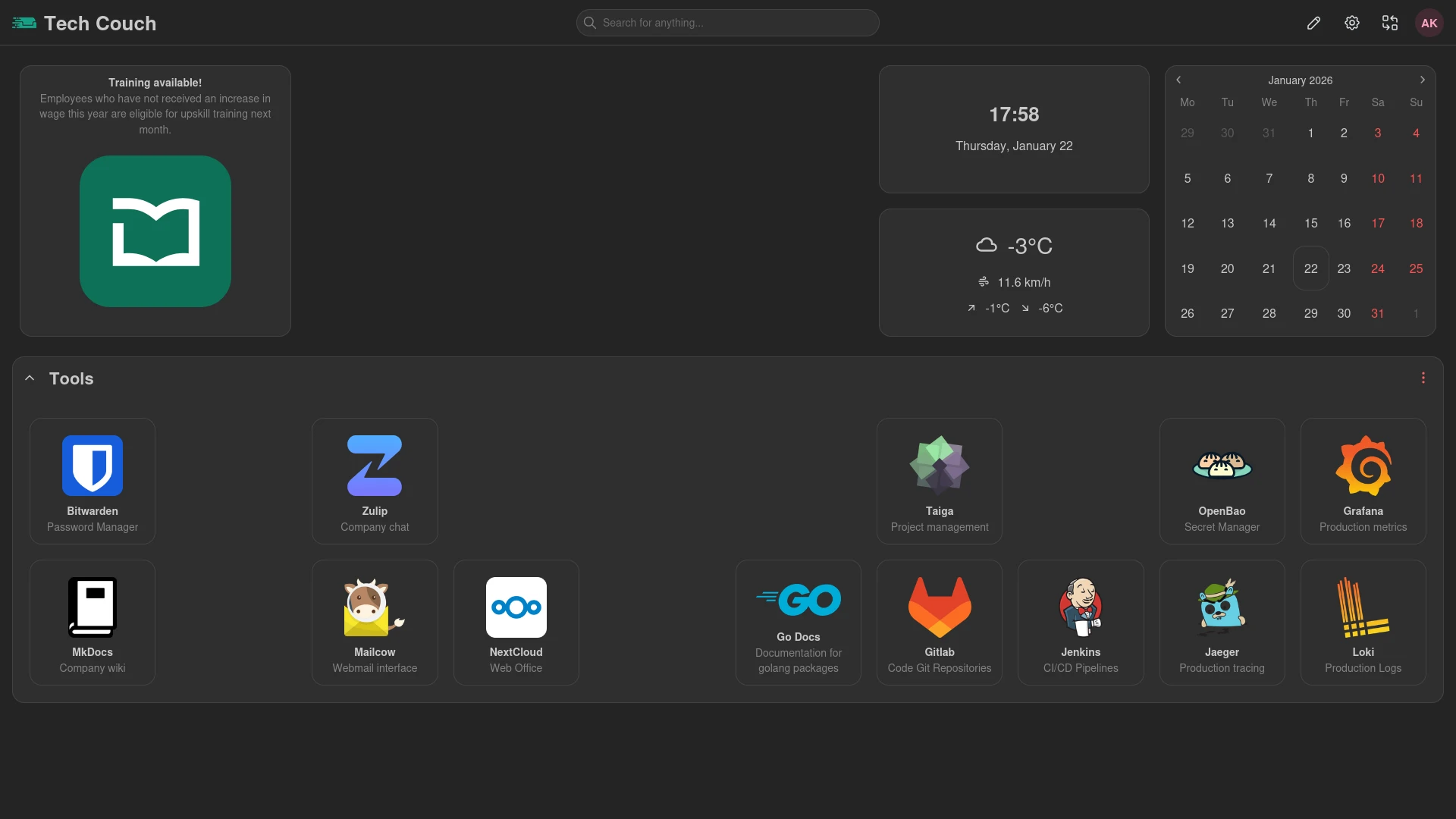
Using homarr instead of an internal wiki is easier to organize visually, and allows setting default dashboards per group, so every user gets a landing page tailored to their position, only containing tools they actually need.
Groups can be synced through OIDC if enabled, further reducing administrative overhead.
Configuring a homarr instance
The easiest way to set up homarr is through docker:
docker-compose.yml
services:
  homarr:
    container_name: homarr
    image: ghcr.io/homarr-labs/homarr:latest
    restart: unless-stopped
    volumes:
      - ./volumes/homarr/appdata:/appdata
    ports:
      - '7575:7575'
    environment:
      SECRET_ENCRYPTION_KEY: # generate with 'openssl rand -hex 32'
      #AUTH_OIDC_CLIENT_ID: # your client id
      #AUTH_OIDC_CLIENT_SECRET: # your client secret
      #AUTH_OIDC_AUTO_LOGIN: true
      #AUTH_PROVIDERS: oidc
      #AUTH_OIDC_URI: # your oidc uri
      #AUTH_OIDC_ISSUER: # your oidc issuer
      #AUTH_LOGOUT_REDIRECT_URL: # your redirect url
      #AUTH_OIDC_CLIENT_NAME: # your client name
      #AUTH_OIDC_GROUPS_ATTRIBUTE: groups #inherit groups from this OIDC attribute
      #BASE_URL: https://home.sample.com
Start the instance with:
docker compose up -dOnce started, it is available at localhost:7575.
In order to lock it down for reasonable company-internal usage, a few settings need to be adjusted. Open the Manage page and adjust the instance:
Integrations: Delete all integrations you do not plan to useSearch engines: Delete all search engines you do not want your users to use. Deleting all makes the search bar unusable, which may be desirable for an internal dashboard.Tools>Tasks: Disable all background tasks you do not need. Weather and Icons Updater may be useful, the rest is largely unnecessary for a commercial instance.Settings: Force-disable app status and optionally disable gravatar images for users to preserve privacy.
With the settings adjusted for an internal landing page, the instance will need only minimal hardware resources and is ready for the first dashboard.
Composing dashboards
You can add new boards under Manage > Boards. Open the board, click the pencil to edit it, and select New Item from the dropdown of the newly appeared plus icon.
For most company instances, only a few items are relevant:
App: A large icon with an optional name and target link. Works as a clickable shortcut to an address outside the dashboard.Calendar: Shows current month and day, with integrations for iCal and Nextcloud events.Date and Time: Shows current date and timeiFrame: Interactively embeds an external website.Notebook: A large text input for personal notes, with full markdown support.Weather: Shows current weather forecast, might be useful for employees visiting customers or scheduling outdoor demos.
Adding an item works by choosing one from the list, then editing the newly added empty item on the board to select icons, title, link targets etc.
Especially the iFrame item can be very flexible, for example by directly embedding a project management instance:
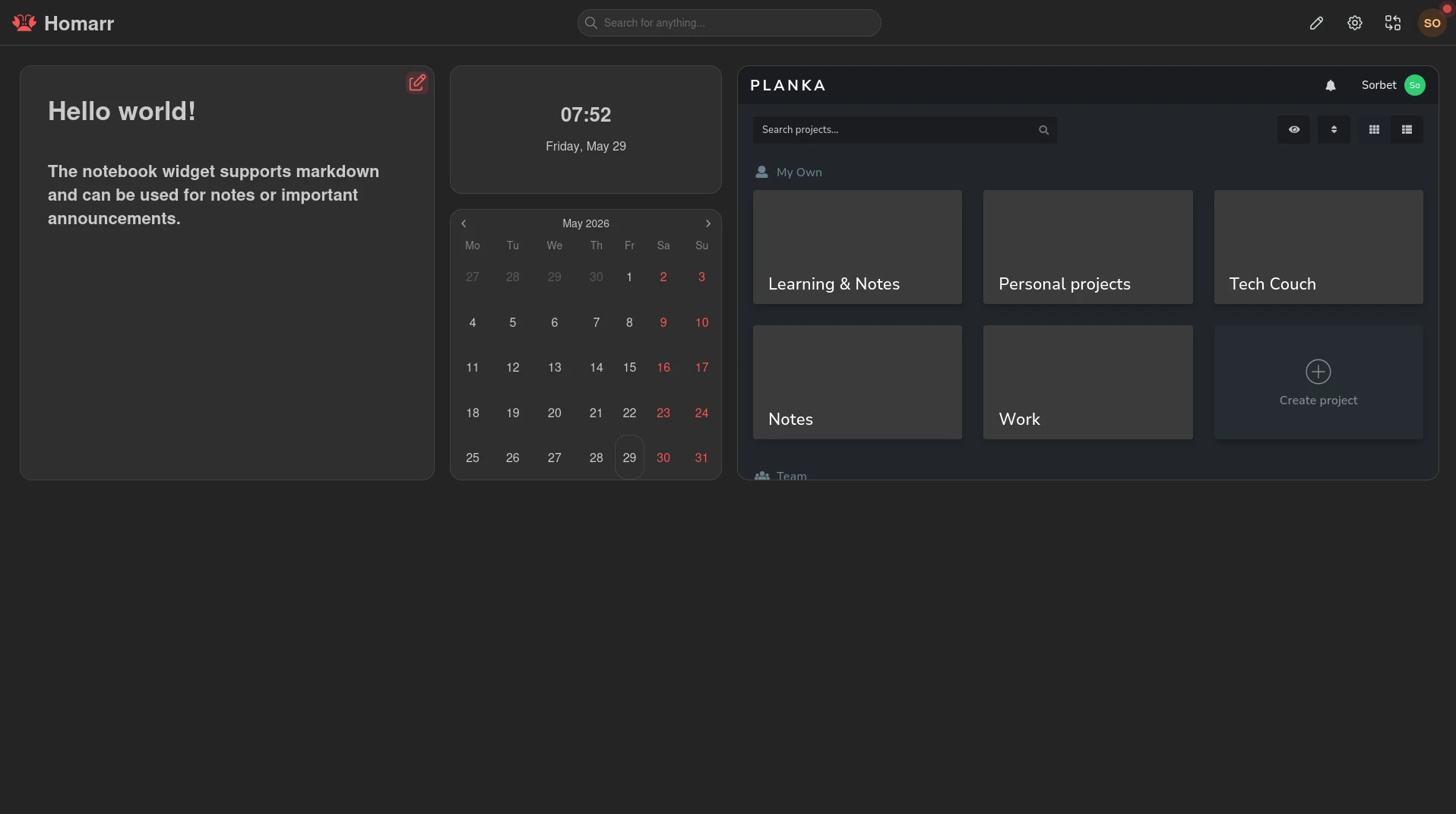
Layouts and item placements can be easily customized. When done setting up the board, click the pencil icons at the top again to save it.
In order to automatically redirect users to their correct board based on group, you first need to open the board settings and allow the group access to the board. Then, navigate to Manage > Users > Groups, edit the desired group and set their Home board to the board you want under Settings.
The advantages of homarr
There are numerous advantages to homarr.
It provides a single unified interface to all tools and links for all employees while maintaining boards tailored per-role, so users only see items relevant to their work.
New hires only have to remember a single tool to reach every other one, reducing cognitive load. Onboarding may even have a custom board to further speed up the process or act as a guideline on how to collaborate.
Simple drag-and-drop allows non-technical users to maintain or adjust boards on the fly as needed, without increasing tech staff load.
Since it is only a collection of links without credentials or tokens, it has virtually no blast radius. The embedded database removes the attack surface of an external database as well.
The lightweight nature means it can easily run on a few hundred MB of ram and a single CPU core, alongside other internal tooling or a tiny VPS.
Finally, employees can create their own customized dashboards to further optimize their workflow, without affecting other users or losing access to the default ones.
These small wins stack up over time, helping tools to stay relevant and used, removing cost overhead of underutilized services and keeping staff informed.